How to put your friends' faces on the aliens
It takes about a minute. Pick a picture, the game finds the faces in it, you give them names — and from then on they are the invaders.
The whole flow
-
Open the Invader Studio
From the main menu, tap Studio. Every face in the game is added, named and removed from this one screen. -
Tap "Add from Photos"
The system photo picker opens. You can choose up to four pictures at a time. This is Apple's own picker running outside the game, which is why iOS never asks you to grant photo access — the game has no such permission to request. -
Let the game find the faces
Detection runs on your device and takes up to six faces from each picture. Each one is cropped to a square and padded outwards, so hair and chin make it inside the circle instead of being sliced off. -
Name each invader
Tap a face and type a name. That name is announced before the fight when the face fronts a galaxy boss, which is the entire reason to bother naming them. -
Play
Faces are cast into levels from then on, and one of them fronts the boss at the end of every galaxy. A level always casts the same face in the same slot, so your friends keep their parts.
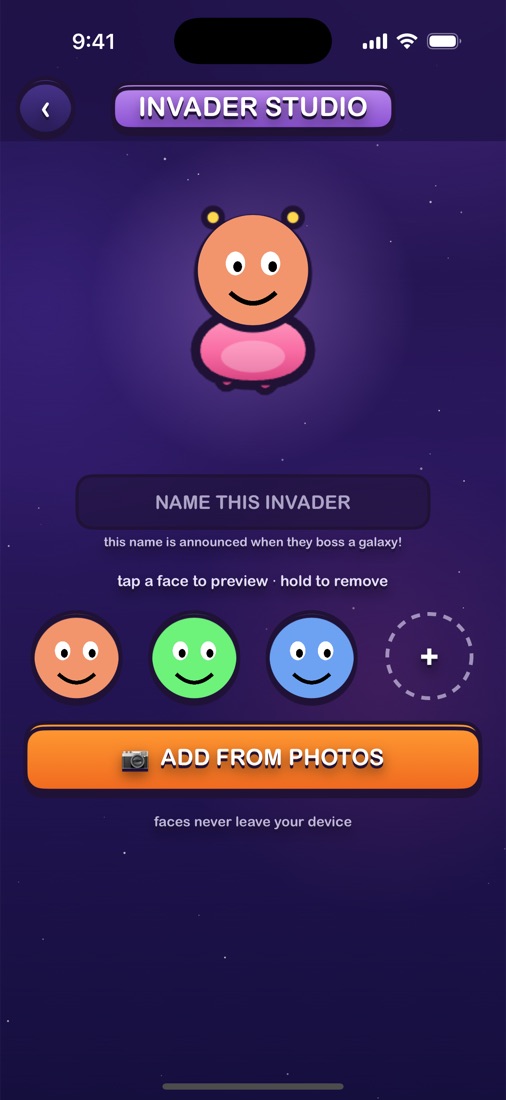
The Studio. Tap a face to preview it on the invader, hold to remove it.
The limits, precisely
- 12 faces in the library at once
- 6 faces detected per picture
- 4 pictures per trip to the photo picker
When the library is full the game stops accepting new faces until you remove one. Removing a face also deletes the copy stored on your device.
Questions about faces
How many faces can I keep in the game?
Twelve. Since one picture can contribute up to six faces and you can pick four pictures at a time, the library fills up fast. Hold a face in the Studio to remove it and make room.
What happens if the game cannot find a face in my picture?
It falls back to a square crop from the middle of the picture and offers you that instead, so you still get an invader out of it.
Can I use a drawing or a pet instead of a person?
Yes, and that fallback is exactly why. Detection is looking for human faces, so a dog or a doodle usually falls through to the centre crop — which works fine as an invader.
How do I remove a face I added?
Press and hold it in the row of faces in the Studio. The face goes, and so does the copy of it stored on your device.